One-Click registration, Check-In, booking and billing a patient's appointment in a multi-doctor high-volume walk-in clinic?
In high-volume walk-in clinics, knowing in advance which doctor will attend to a patient is only sometimes possible.
That is why in HYPEMedical users can book a patient for an appointment, in a single click, under a generic "Walk-in doctor" from the Patient Profile. In addition, a user can force-bill "Walk-in doctor" appointments to a specific doctor in bulk.
Appointment booking workflow for Walk-In:
- Enter a health number and version code, or swipe a health card
In response, HYPEMedical loads patient's demographics from, OHIP's server, or its database. - Front desk user completes or verifies address etc.
- Front desk user clicks the Walk-in command button.
And repeat

Register & schedule a patient without ever opening the appointment book!
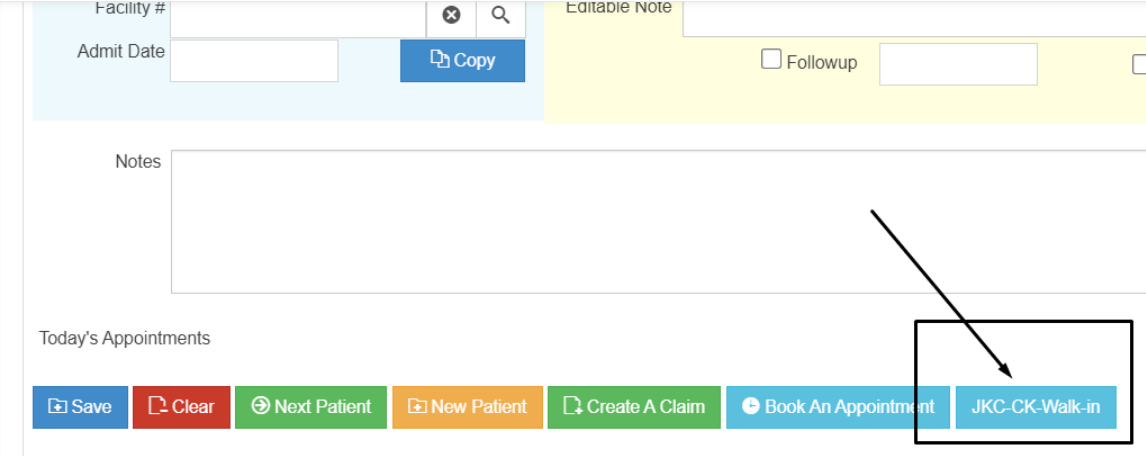 One Click books an appointment
Bulk billing generic doctor walk-in appointments, for each attending doctor:
- Load the day's appointments on the Bill Appointments widget on the Home page.
- Group (check-mark) the appointments that belong to a particular doctor.
- Click on Create Claims and lock 🔒 your doctor in the claim form as you bill in bulk.
*Originally published August 8, 2020